|
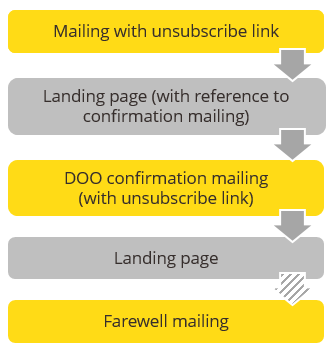
Description of unsubscribe procedure step |
Necessary settings |
|---|---|
|
The recipient clicks the unsubscribe link. |
|
|
A (JSP) unsubscription confirmation web page appears, on which the recipient must confirm their unsubscription. |
Create a (JSP) unsubscription confirmation web page (either manually or using the JSP ‘Confirm unsubscribe’ template in Inxmail Professional, JSP templates ‘Cancel subscription’ and ‘Confirm unsubscribe’) |
|
After confirming, a landing page informs the recipient that they have successfully unsubscribed from the mailing list and their data has been deleted. |
Create a landing page (either manually or using the JSP ‘Confirm unsubscribe’ template in Inxmail Professional, JSP templates ‘Cancel subscription’ and ‘Confirm unsubscribe’) |
|
Optional: The recipient receives a farewell mailing. |
Optional: Customise, approve and activate a farewell mailing (Displaying, sorting and filtering the subscribe/unsubscribe mailings table). |
Inxmail Professional:
2 possible use cases
Depending on your contract, you might use Inxmail Professional in different ways:
 Learn more
-
As part of the Inxmail platform: You use newsletters & campaigns as your main tool for creating and sending newsletters. Inxmail Professional only serves as a recipient database and configuration tool in the background.
We are constantly expanding the functionality of “Newsletters & Campaigns”. Check out newsletters & campaigns section to find out if the feature you are looking for might already be available there.
-
Full scope: You use the legacy tool Inxmail Professional as your main tool for creating and sending newsletters.
Did you not find what you were looking for?
-
Send us your feedback.
