|
Details for the example |
|
|---|---|
|
Data source |
XML file ‘Best sellers’ product feed from online shop |
|
Transformation |
Yes – transformation to XML structure of the Inxmail Smart Template |
|
Personalisation/ |
No |
|
Agent |
|
|
Time of the update |
Editing time |

Notes on the example
In this example, a product feed from an online shop is used as the data source. Many online shop systems, such as Magento or Oxid, for example, provide product data in XML format. The product feed in this example transfers the two bestseller products from the online shop to Inxmail Professional.
Further standardised product feeds can be:
- Latest products
- Related products
- Random products
Through the transformation, the XML data is transformed to the structure of a two-column article in the Advanced Template.
URL of the data source
https://example-shop.com/index.php/datasource/list/type/bestsell/
XML file
Product feed from Magento online shop
(For more information, see the section Setup for Magento)
Transformation
Detailed information can be found in the section Showing the XML structure of template elements and Developing an XSL transformation.
Display in the mailing
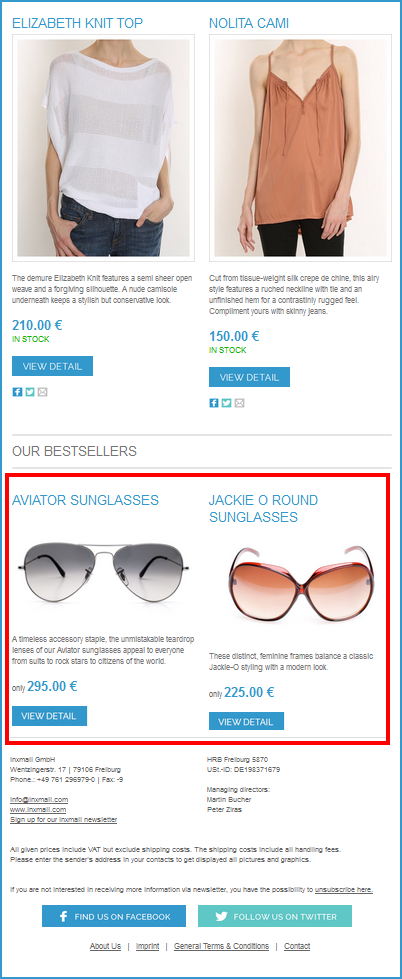
Inxmail Professional:
2 possible use cases
Depending on your contract, you might use Inxmail Professional in different ways:
 Learn more
-
As part of the Inxmail platform: You use newsletters & campaigns as your main tool for creating and sending newsletters. Inxmail Professional only serves as a recipient database and configuration tool in the background.
We are constantly expanding the functionality of “Newsletters & Campaigns”. Check out newsletters & campaigns section to find out if the feature you are looking for might already be available there.
-
Full scope: You use the legacy tool Inxmail Professional as your main tool for creating and sending newsletters.
Did you not find what you were looking for?
-
Send us your feedback.
