A recipient can access the ‘Profile management’ Web page in two different ways.
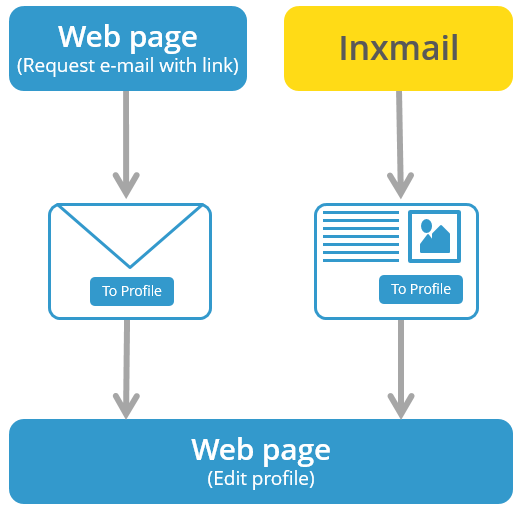
You can provide the recipient with a so-called login Web page that allows them to trigger the sending of an email with a link to the ‘Profile management’ Web page. They can therefore enter details about themself on their own initiative by visiting the login Web page on your website. This can be desirable in order to update the family name, for example.
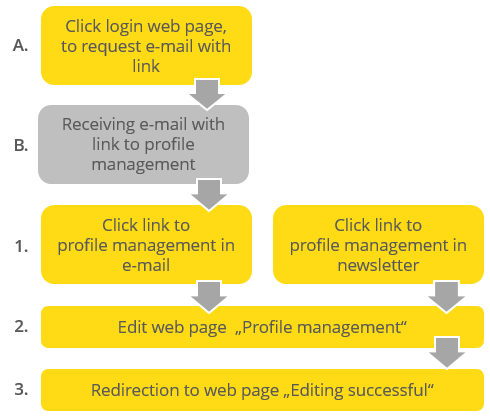
You can also integrate the link to the ‘Profile management’ Web page in your regular mailings. After receiving the newsletter, the recipient can use the opportunity to update their profile (Steps 1 to 3).
You can employ both procedures simultaneously.
Inxmail Professional:
2 possible use cases
Depending on your contract, you might use Inxmail Professional in different ways:
 Learn more
-
As part of the Inxmail platform: You use newsletters & campaigns as your main tool for creating and sending newsletters. Inxmail Professional only serves as a recipient database and configuration tool in the background.
We are constantly expanding the functionality of “Newsletters & Campaigns”. Check out newsletters & campaigns section to find out if the feature you are looking for might already be available there.
-
Full scope: You use the legacy tool Inxmail Professional as your main tool for creating and sending newsletters.
Did you not find what you were looking for?
-
Send us your feedback.
