Affected level:
-
 (Standard) mailing list
--
The Grant tracking permission link allows you to obtain consent to person-based tracking from your recipients. As soon as a recipient clicks this link in the mailing, the value in the Tracking permission column is set to  Yes.
Yes.
GDPR
Step by step
To add a tracking permission link to a mailing, proceed as follows:
- Open the mailing in the
 Editing workflow step.
 - Click the position in your mailing where you would like to insert the tracking permission link.
-
You can integrate different link types into a mailing by clicking
 (Insert link) in the mailing editor or by using the Ctrl + K shortcut.
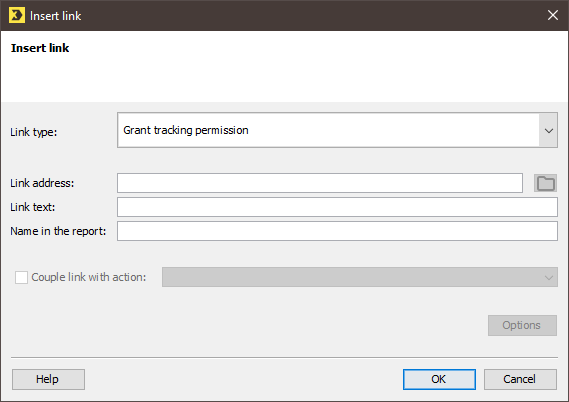
A dialog box appears.
-
Select Grant tracking permission to add a link with which the recipient can give their consent to person-based tracking.
Select Withdraw tracking permission to add a link with which the recipient can withdraw their consent to person-based tracking.
- In the Link address field, specify the URL (https://...) of the Web page to which the link points.
-
In the Link text field, specify a text that will be connected to the link and displayed in the mailing.
If you leave the Link text field empty, the link address will be displayed in HMTL mailings. In text mailings, the link text will be displayed in front of the link address.
- Enter a (descriptive) name in the Name in the report field. The link will be included in the reports under this name.
- Confirm your entries by clicking OK.
- You have added a tracking permission link to a mailing.
Inxmail Professional:
2 possible use cases
Depending on your contract, you might use Inxmail Professional in different ways:
 Learn more
-
As part of the Inxmail platform: You use newsletters & campaigns as your main tool for creating and sending newsletters. Inxmail Professional only serves as a recipient database and configuration tool in the background.
We are constantly expanding the functionality of “Newsletters & Campaigns”. Check out newsletters & campaigns section to find out if the feature you are looking for might already be available there.
-
Full scope: You use the legacy tool Inxmail Professional as your main tool for creating and sending newsletters.
Did you not find what you were looking for?
-
Send us your feedback.
