|
Details for the example |
|
|---|---|
|
Data source |
XML files |
|
Transformation |
Yes |
|
Personalisation/ |
Yes |
|
Agent |
|
|
Time of the update |
Sending time |

Notes on the example
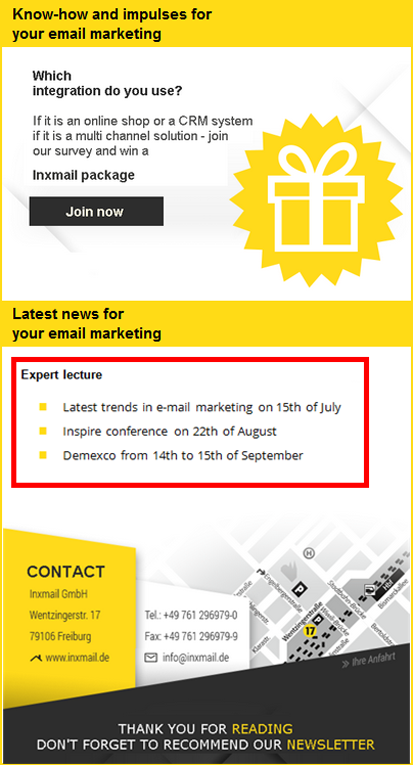
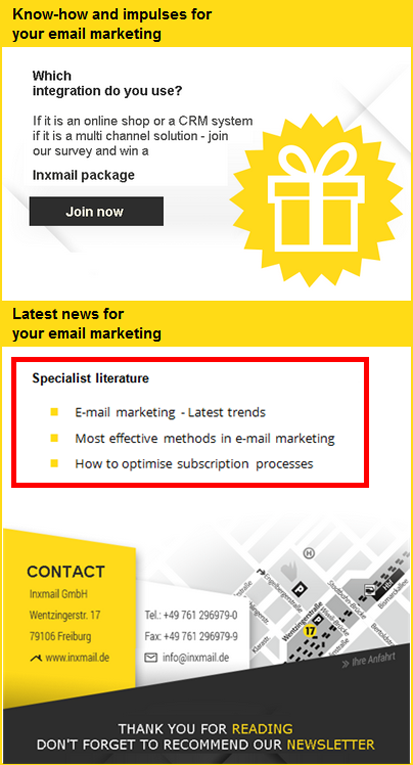
In this example, two XML files are used as the data source. The recipient attribute information is passed to the data source. Depending on whether the value specialist literature or expert lecture is entered for the recipient, the values from the corresponding XML file are transferred to Inxmail Professional.
Through the transformation, the corresponding XML file is transformed to a table in HTML format and integrated into the mailing.
URL of the data source
https://example.com/content/[$information].xml
XML files
specialistliterature.xml
<?xml version="1.0" encoding="UTF-8" standalone="yes"?>
<xmlinformation>
<information>Specialist literature</information>
<date1>E-mail marketing - Latest trends</date1>
<date2>Most effective methods in e-mail marketing</date2>
<date3>How to optimise subscription processes</date3>
</xmlinformation>expertlecture.xml
<?xml version="1.0" encoding="UTF-8" standalone="yes"?>
<xmlinformation>
<information>Expert lecture</information>
<date1>Latest trends in e-mail marketing on 15th of July</date1>
<date2>Inspire conference on 22th of August</date2>
<date3>Demexco from 14th to 15th of September</date3>
</xmlinformation>Transformation
<?xml version="1.0" encoding="UTF-8"?>
<xsl:stylesheet version="1.0" xmlns:xsl="http://www.w3.org/1999/XSL/Transform">
<xsl:template match="/xmlinformation">
<table border="0">
<tr>
<td><xsl:value-of select="date1"/></td>
</tr>
<tr>
<td><xsl:value-of select="date2"/></td>
</tr>
<tr>
<td><xsl:value-of select="date3"/></td>
</tr>
</table>
</xsl:template>
</xsl:stylesheet> Display in the mailing
|
|
|
Inxmail Professional:
2 possible use cases
Depending on your contract, you might use Inxmail Professional in different ways:
 Learn more
-
As part of the Inxmail platform: You use newsletters & campaigns as your main tool for creating and sending newsletters. Inxmail Professional only serves as a recipient database and configuration tool in the background.
We are constantly expanding the functionality of “Newsletters & Campaigns”. Check out newsletters & campaigns section to find out if the feature you are looking for might already be available there.
-
Full scope: You use the legacy tool Inxmail Professional as your main tool for creating and sending newsletters.
Did you not find what you were looking for?
-
Send us your feedback.
