|
Details for the example |
|
|---|---|
|
Data source |
XML file |
|
Transformation |
Yes |
|
Personalisation/ |
No |
|
Agent |
|
|
Time of the update |
Sending time |
 Content
Notes on the example
In this example, a simple XML file is used as the data source. In the XML file, different sales representatives are assigned to the various federal states.
Through the transformation, the XML file is transformed to a table in HTML format and integrated into the mailing.
URL of the data source
https://example.com/content/vertreter.xml
XML file
<?xml version="1.0" encoding="UTF-8" standalone="yes"?>
<xmlexample>
<title>Sales representatives</title>
<entry>
<district>City of London</district>
<representative>Chris Leister</representative>
</entry>
<entry>
<district>Cornwall</district>
<representative>Cate Murray</representative>
</entry>
<entry>
<district>Dorset</district>
<representative>Dan Peters</representative>
</entry>
<entry>
<district>Greater London</district>
<representative>Gerry Miller</representative>
</entry>
<entry>
<district>Kent</district>
<representative>Kate Summer</representative>
</entry>
<entry>
<district>Somerset</district>
<representative>Sue Carter</representative>
</entry>
<entry>
<district>Yorkshire</district>
<representative>Zoe Shine</representative>
</entry>
</xmlexample>Transformation
<?xml version="1.0" encoding="UTF-8"?>
<xsl:stylesheet version="1.0" xmlns:xsl="http://www.w3.org/1999/XSL/Transform">
<xsl:template match="/">
<table border="1" bordercolor="#FFFFFF">
<tr>
<th style="text-align:left">District</th>
<th style="text-align:left">Sales representative</th>
</tr>
<xsl:for-each select="xmlexample/entry">
<tr>
<td><xsl:value-of select="district"/></td>
<td><xsl:value-of select="representative"/></td>
</tr>
</xsl:for-each>
</table>
</xsl:template>
</xsl:stylesheet>Display in the mailing
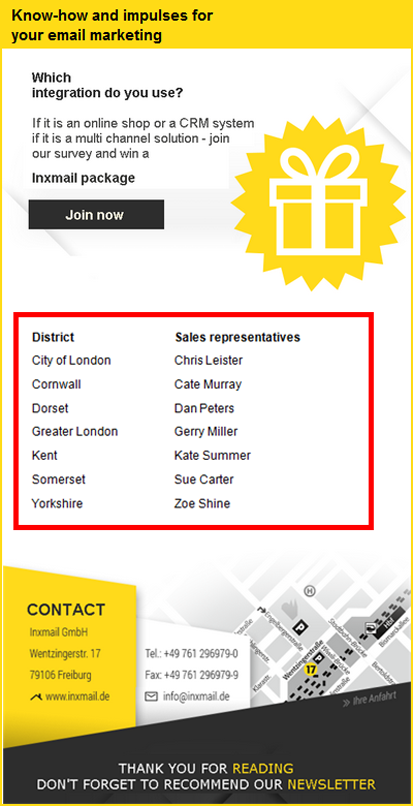
Inxmail Professional:
2 possible use cases
Depending on your contract, you might use Inxmail Professional in different ways:
 Learn more
-
As part of the Inxmail platform: You use newsletters & campaigns as your main tool for creating and sending newsletters. Inxmail Professional only serves as a recipient database and configuration tool in the background.
We are constantly expanding the functionality of “Newsletters & Campaigns”. Check out newsletters & campaigns section to find out if the feature you are looking for might already be available there.
-
Full scope: You use the legacy tool Inxmail Professional as your main tool for creating and sending newsletters.
Did you not find what you were looking for?
-
Send us your feedback.
