This section contains an overview of the standard modules available in Inxmail Commerce.
Note: We can create custom modules specially tailored to your requirements, if desired. Note: Contact your Inxmail contact person or Care-Consulting@inxmail.de for more information.
Text modules
|
One-column text |
This module allows you to display text over the entire width of the mailing. Mobile display This module is scaled in the mobile display, that is, it is reduced according to the screen size of the mobile device. |
|
|
Two-column text |
This module allows you to display text in two or three columns. This way, you can freely specify the distance between the columns, among other things. Mobile display Within the respective module, you can specify whether the texts should be displayed side by side or one below the other (wrapping). |
|
|
Three-column text |
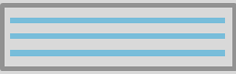
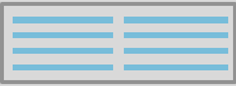
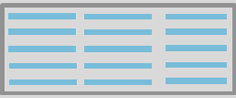
Image modules
|
One-column image |
This module allows you to display an image over the entire width of the mailing. Mobile display This module is scaled in the mobile display, that is, it is reduced according to the screen size of the mobile device. |
|
|
Two-column image |
These modules allow you to display images in two, three, four or five columns. This way, you can freely specify the distance between the columns, among other things. Mobile display Within the respective module, you can specify whether the images should be displayed side by side or one below the other (wrapping). |
|
|
Three-column image |
||
|
Four-column image |
||
|
Five-column image |



Image/text modules
|
Image/text |
These modules allow you to display text and an image side by side. Mobile display Within the respective module, you can specify whether text and an image should be displayed side by side or one below the other (wrapping). |
|
|
Text/image |
|
|
|
Two-column article |
Articles consist of a combination of image and text. The text is displayed under the (first) image. Mobile view Articles wrap in mobile view. This means, in the case of two-column articles, article 2 is displayed under article 1. This means, in the case of three-column articles, article 3 is additionally displayed under article 2. |
|
|
Three-column article |




Spacer
|
Spacer |
This module acts as a spacer between the other modules. |
Dividing line
|
Dividing line |
This module allows you to insert a dividing line between modules. |
Function modules
|
Article list |
This module automatically generates a list with articles that are transferred from the source system to Inxmail Commerce for the respective transactional mailing. The list contains one image per article and key information about the article such as the article name, article number and price. |
|
|
Order amount |
This module displays the amount for the ordered articles. Shipping costs and discounts, among other things, are automatically displayed, if these are transferred from the source system. |
|